
FaceID工作流
工作流
当我们顺利完成了上面的所有安装之后,你就可以使用“ComfyUI_IPAdapter_plus”节点来进行换脸了!比起reactor等换脸插件,“ComfyUI_IPAdapter_plus”的换脸行为发生在图片生成之前,所以最后的效果会更加自然!下面是一个换脸操作的案例:
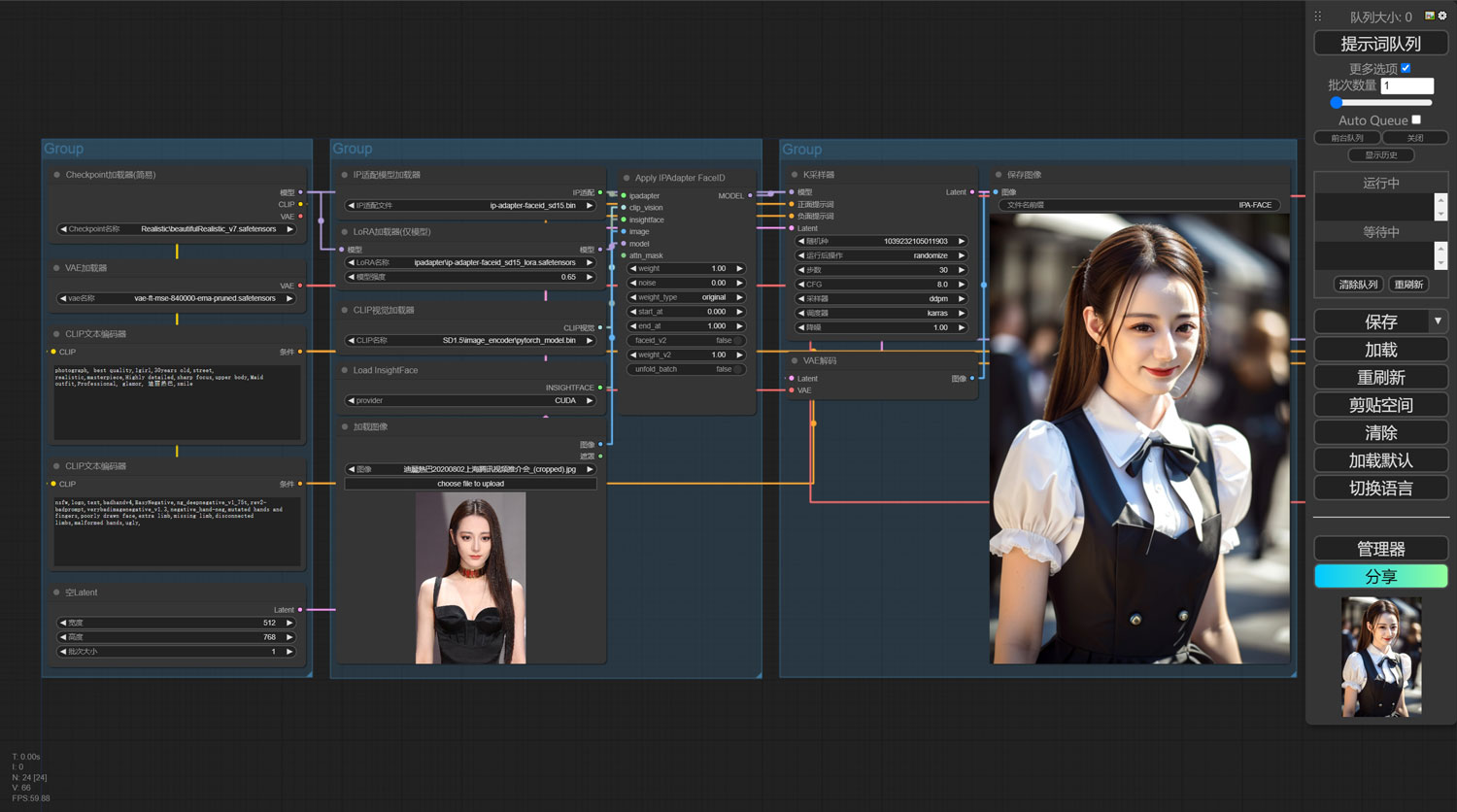
可见该工作流的换脸效果还是非常自然的,下面我会将该工作流分享出来,你可以直接将下载的工作流图片拖入到你的comfyui界面中,即可导入该工作流!
如果有出现了红色的报错,那么你可以打开“管理器”,运行“安装缺失节点”!
注意事项
工作流注意事项说明:
- ipadapter模型和lora模型一定要匹配;
- 可以根据自己的需要调整lora的权重,数字越大上传的参考图片对生成的图片影响越大,包括画质和构图,适当降低该权重,可以让AI发挥的空间越大,画面越自然,但是换脸效果可能会降低;
- ipadapter模型中的plus版和plusV2版本在换脸效果上并不比基础版要好,但是在画质上会相对较好;
- 工作流的最后面的组是高清放大和面部修复,该组我已经默认设置为“停用”模式,如果你有需要可以右键“启用该组节点”;
- 高清放大节点中的“降噪”参数设置得越小,高清放大之后的图片人物面部就越接近原图,过大的“降噪”参数会让高清放大之后的人物改变人脸的样式,该参数建议设置在0.05以下!
需要此工作流的可以从下面下载↓↓↓
原创文章,作者:朋远方,如若转载,请注明出处:https://caovan.com/aihuihuajiaochengzaicomfyuizhongshiyongipadapater-faceidjiedianjinxinghuanlian/.html
 微信扫一扫
微信扫一扫 
![[图文对照]stable diffusion人物表情提示词大全](https://caovan.com/./uploads/2023/08/face-promptcaovan-480x300.jpg)




评论列表(18条)
请问出现“Error occurred when executing IPAdapterApplyFaceID:
CLIPVisionModelWithProjection.forward() got an unexpected keyword argument ‘intermediate_output’”
@1223:应该是clip_vision的模型没有安装正确
@朋远方:不行啊,我把原来的Clip_Vision的模型删除了重新下载了还是出同意的问题。
@朋远方:找到原因了,IP适配模型不能用plus的,一用就出错。
@1223:可以用plus的模型,但是你要lora模型也必须使用plus版本的,如果是plusV2版本的模型,你还需要将Apply IPAdapter FaceID节点中的faceid_v2 设置为TRUE
请教 InsightFaceLoader 报这个错是为什么呀
Error occurred when executing InsightFaceLoader:
No module named ‘onnx.onnx_cpp2py_export.defs’; ‘onnx.onnx_cpp2py_export’ is not a package
File “D:\Blender_ComfyUI\ComfyUI\execution.py”, line 154, in recursive_execute
output_data, output_ui = get_output_data(obj, input_data_all)
File “D:\Blender_ComfyUI\ComfyUI\execution.py”, line 84, in get_output_data
return_values = map_node_over_list(obj, input_data_all, obj.FUNCTION, allow_interrupt=True)
File “D:\Blender_ComfyUI\ComfyUI\execution.py”, line 77, in map_node_over_list
results.append(getattr(obj, func)(**slice_dict(input_data_all, i)))
File “D:\Blender_ComfyUI\ComfyUI\custom_nodes\ComfyUI_IPAdapter_plus\IPAdapterPlus.py”, line 529, in load_insight_face
raise Exception(e)
@啊啊啊no:insightface库没有安装或者安装错误
Error occurred when executing KSampler:
Query/Key/Value should either all have the same dtype, or (in the quantized case) Key/Value should have dtype torch.int32
query.dtype: torch.float16
key.dtype : torch.float32
value.dtype: torch.float32
Ksampler 报错
非常感谢您的教程,对新手很友好。
大佬,这个问题怎么解决?
Error occurred when executing InsightFaceLoader:
No module named ‘sklearn’
File “D:\App\Blender_ComfyUI\ComfyUI\execution.py”, line 155, in recursive_execute
output_data, output_ui = get_output_data(obj, input_data_all)
File “D:\App\Blender_ComfyUI\ComfyUI\execution.py”, line 85, in get_output_data
return_values = map_node_over_list(obj, input_data_all, obj.FUNCTION, allow_interrupt=True)
File “D:\App\Blender_ComfyUI\ComfyUI\execution.py”, line 78, in map_node_over_list
results.append(getattr(obj, func)(**slice_dict(input_data_all, i)))
File “D:\App\Blender_ComfyUI\ComfyUI\custom_nodes\ComfyUI_IPAdapter_plus-main\IPAdapterPlus.py”, line 537, in load_insight_face
raise Exception(e)
@ldz3:缺少“sklearn”这个Python库,你进到虚拟环境,pip install sklearn 一下这个库
想问下大佬,运行到InsightFace加载器的时候,出现这个报错是什么原因呀?
Error occurred when executing InsightFaceLoader:
module ‘onnxruntime’ has no attribute ‘InferenceSession’
File “G:\ComfyUI\Blender_ComfyUI\ComfyUI\execution.py”, line 152, in recursive_execute
output_data, output_ui = get_output_data(obj, input_data_all)
File “G:\ComfyUI\Blender_ComfyUI\ComfyUI\execution.py”, line 82, in get_output_data
return_values = map_node_over_list(obj, input_data_all, obj.FUNCTION, allow_interrupt=True)
File “G:\ComfyUI\Blender_ComfyUI\ComfyUI\execution.py”, line 75, in map_node_over_list
results.append(getattr(obj, func)(**slice_dict(input_data_all, i)))
File “G:\ComfyUI\Blender_ComfyUI\ComfyUI\custom_nodes\ComfyUI_IPAdapter_plus\IPAdapterPlus.py”, line 625, in load_insight_face
from insightface.app import FaceAnalysis
File “G:\ComfyUI\Blender_ComfyUI\python_embeded\lib\site-packages\insightface\__init__.py”, line 16, in
from . import model_zoo
File “G:\ComfyUI\Blender_ComfyUI\python_embeded\lib\site-packages\insightface\model_zoo\__init__.py”, line 1, in
from .model_zoo import get_model
File “G:\ComfyUI\Blender_ComfyUI\python_embeded\lib\site-packages\insightface\model_zoo\model_zoo.py”, line 22, in
class PickableInferenceSession(onnxruntime.InferenceSession):
@5350:应该是“insightface”安装有问题,你重新安装下insightface
我要疯了,搞了一整天,PC系统、comfy UI、全部重新装了个边。各种教程都尝试了,始终提示no modeul named “insightface.app”,到底是哪里出错了,大神可否告知?不胜感激!
Error occurred when executing InsightFaceLoader:
No module named ‘insightface.app’
File “D:\comfyUIAI\ComfyUI\execution.py”, line 152, in recursive_execute
output_data, output_ui = get_output_data(obj, input_data_all)
^^^^^^^^^^^^^^^^^^^^^^^^^^^^^^^^^^^^
File “D:\comfyUIAI\ComfyUI\execution.py”, line 82, in get_output_data
return_values = map_node_over_list(obj, input_data_all, obj.FUNCTION, allow_interrupt=True)
^^^^^^^^^^^^^^^^^^^^^^^^^^^^^^^^^^^^^^^^^^^^^^^^^^^^^^^^^^^^^^^^^^^^^^^^^^^
File “D:\comfyUIAI\ComfyUI\execution.py”, line 75, in map_node_over_list
results.append(getattr(obj, func)(**slice_dict(input_data_all, i)))
^^^^^^^^^^^^^^^^^^^^^^^^^^^^^^^^^^^^^^^^^^^^^^^^^^^
File “D:\comfyUIAI\comfyUI\custom_nodes\ComfyUI_IPAdapter_plus\IPAdapterPlus.py”, line 627, in load_insight_face
raise Exception(e)
@9100:终于搞明白了,原来就是insightface文件夹下缺少models,网上找到faceID的models拷贝进去,终于跳过去了!啊~~!我的一天两夜,全耗在这个问题上了!!!
Expected query, key, and value to have the same dtype, but got query.dtype: struct c10::Half key.dtype: float and value.dtype: float instead.
这个是什么错误啊,求大神解决
请问博主这个问题如何解决,谢谢!!!
When loading the graph, the following node types were not found:
加载图形时,未找到以下节点类型:
InsightFace加载器
IPAdapter应用(FaceID) IPAdapter应用(FaceID)
@lzqg:https://caovan.com/xinbancomfyui-ipadapter-plusbuzaijianrongjiubanjiedian/.html